Git Prompt Kit: Configurable, Fast Git Status Components For Custom Zsh Themes

A collection of components for displaying Git information in your prompt


What I want in my prompt are the time, whether or not I’m one of my usual users, whether or not I’m on one of my usual hosts, what directory I’m in, whether I’m root, whether the previous command errored, and lots of Git info.
That’s what my zsh theme Hometown shows.
Try it out
Screenshots don’t do justice to all the configurability, or the dynamic content. To really get a feel for Hometown, install it… or play with the docs’ interactive demo!
Which Git data points to include is configurable. The Git data points you do include can appear, disappear, and change colors based on the Git status.
You can configure certain users and hosts as hidden — use that to only show user and/or host if they aren’t your usual.
How much of the directory’s path to show is configurable.
I don’t want to be stuck in the same thing always, and wanted it to be flexible enough for other users to enjoy, so every color and symbol is customizable; there are one-line, two-line, and three-line layout options; and there’s a spot for you insert any arbitrary prompt code you’re missing.
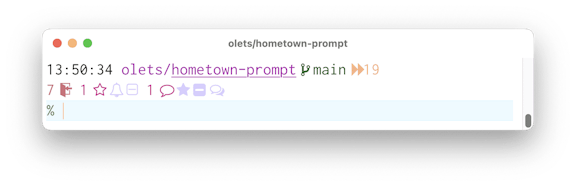
A lot of information, but the presentation is compact. Here’s a screenshot of Hometown with its default configuration:
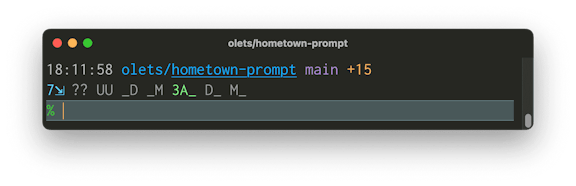
That little thing packs in a lot of information:
hometown-prompt, which is in the olets directorymain is checked out (if HEAD were detached, the checked-out commit’s SHA would be shown)main has an upstream (if it didn’t, the word “local” would be shown)
main’s the upstream is origin/main (if the upstream branch name were different, it would be show; if the upstream’s remote were not origin, it would be shown too)main is zero commits behind its upstream (if it were the “behind” count would be shown)main is fifteen commits ahead of its upstreammain has not be set up for a triangular workflow (if it were the push remote would be shown)%)Not the look you want? Change it!
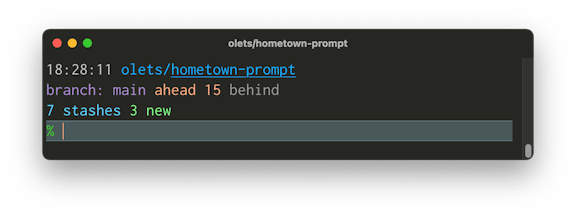
Here’s a screenshot of the same scenario but with Hometown configured to take up three lines, to use words instead of symbols, and to hide inactive status info rather than dimming it.
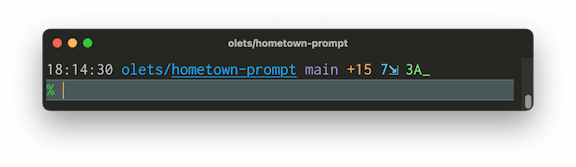
Here’s a screenshot Hometown configured to put everything on one line, and to hide rather than dim inactive status info and inactive behind/ahead.
Here’s on one more screenshot showing custom colors, and custom symbols
That’s just a few of the possibilities: you can mix and match layout customization, color customization, and symbol/word customization. And it’s only one scenario: what is shown changes with the Git status.
Another project to check out
Hometown is built on Git Prompt Kit, a library of feature-rich performant components for adding Git info to your own custom zsh theme. Read about it in Git Prompt Kit: Configurable, Fast Git Status Components For Custom Zsh Themes
Learn more in the Hometown docs.
If you like it, or just feel like saying “nice work”, let me know by starring the GitHub repo.
A collection of components for displaying Git information in your prompt

VuePress supports Algolia-based search, but expects you to use the DocSearch service. This guide shows how to use VuePress’s DocSearch UI with standard Algolia.

Running popular web-based CD tools against each other